Everything Obvious can do.
Explore every capability — from AI modes and memory to documents, automations, and integrations.
Views
Checklists
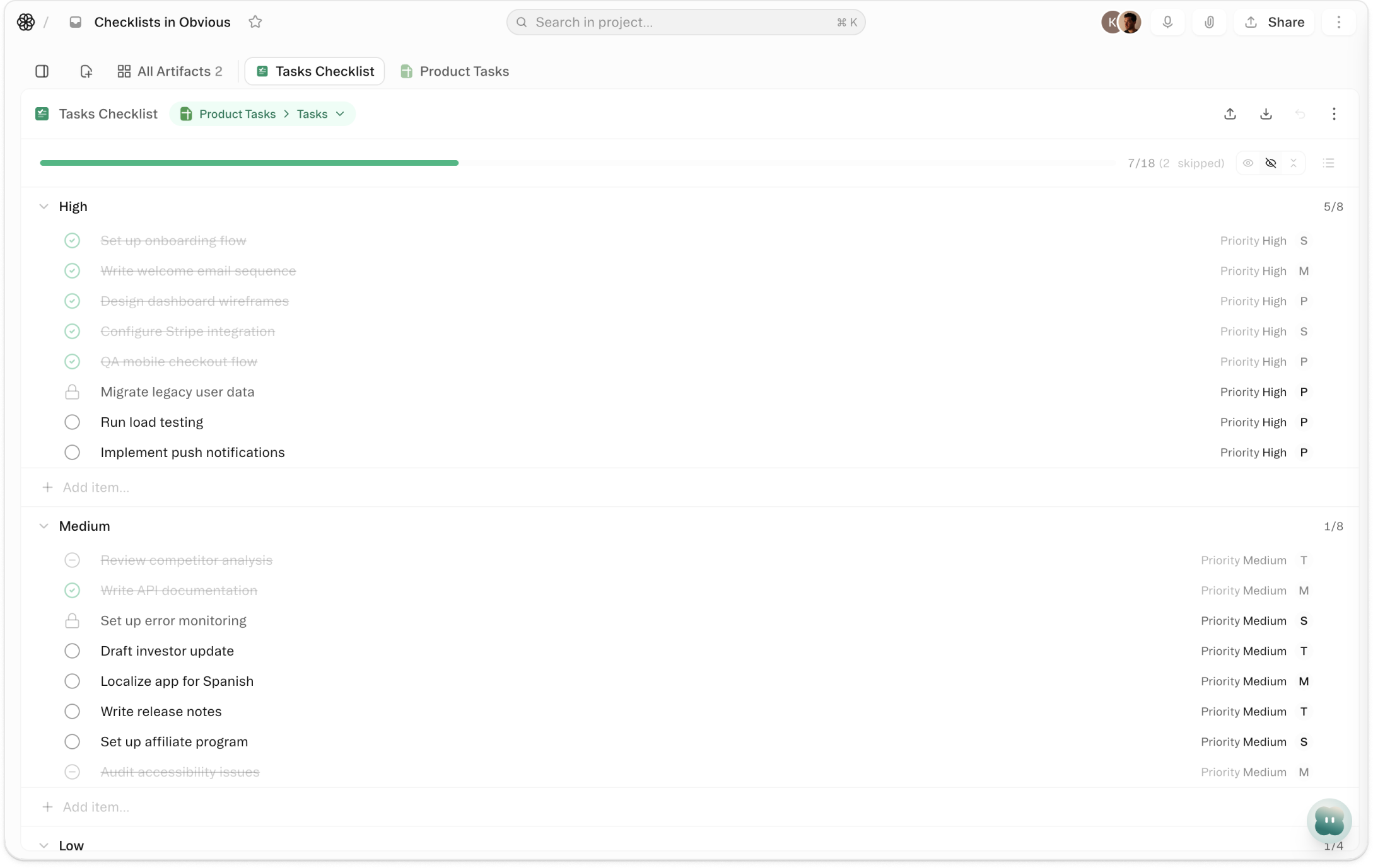
Pick any sheet with a title field and a completion field. Obvious infers the mapping. Click Create. The rows become checklist items — each with a checkbox, a strikethrough when it's done, and a progress bar at the top tracking how many are finished. Check something off in the checklist and the value updates in the sheet instantly. Nothing lives in two places. Nothing gets out of sync.
Artifacts
Templates
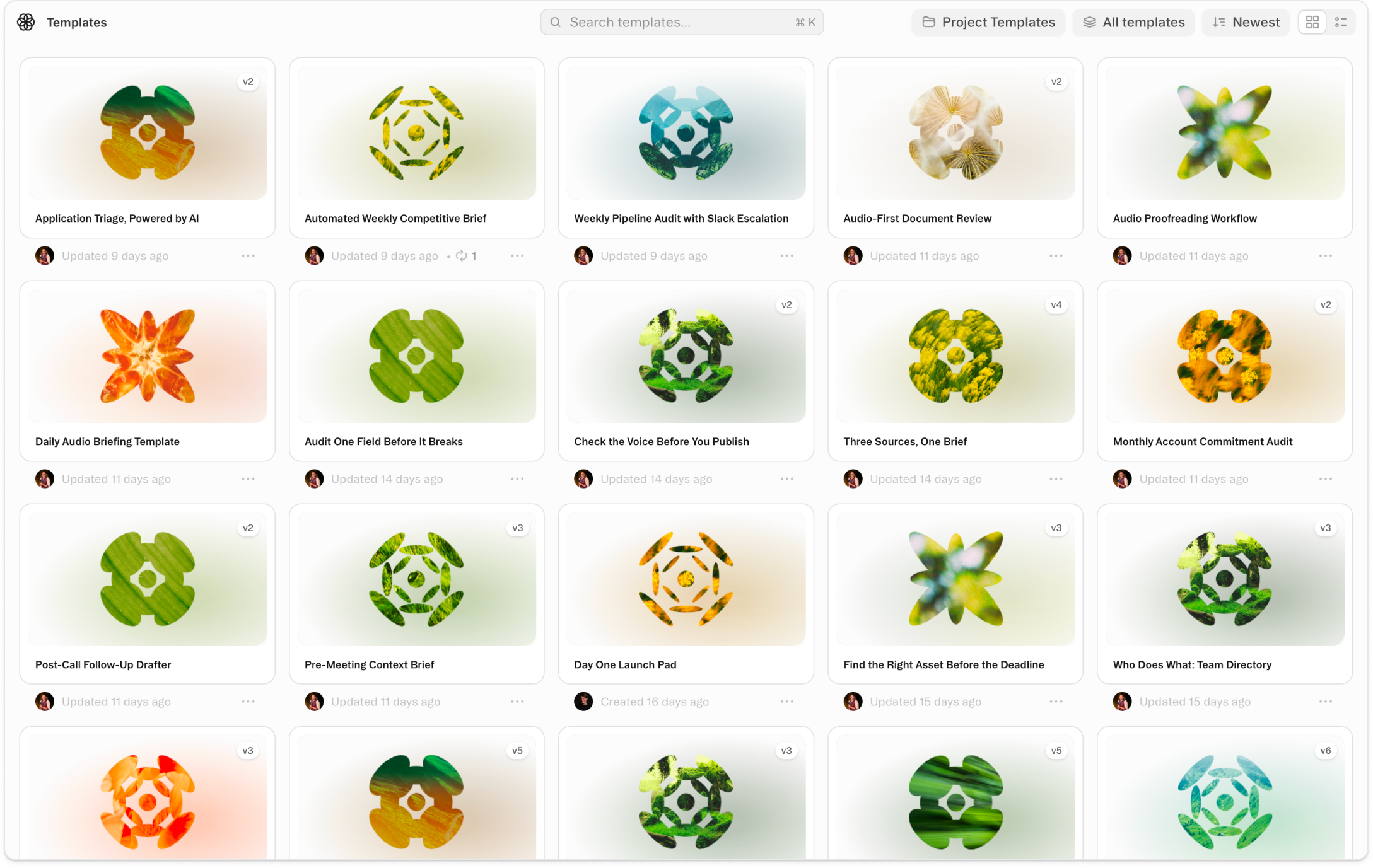
Project Templates let you save any project's structure as a reusable starting point. When you save a project as a template, you choose what to include: the folder structure, all artifacts, saved tasks and schedules, agent context instructions, and the project README. A new project created from that template opens fully configured — folders in place, documents ready, tasks loaded, agent instructions already active.
Platform
Command K
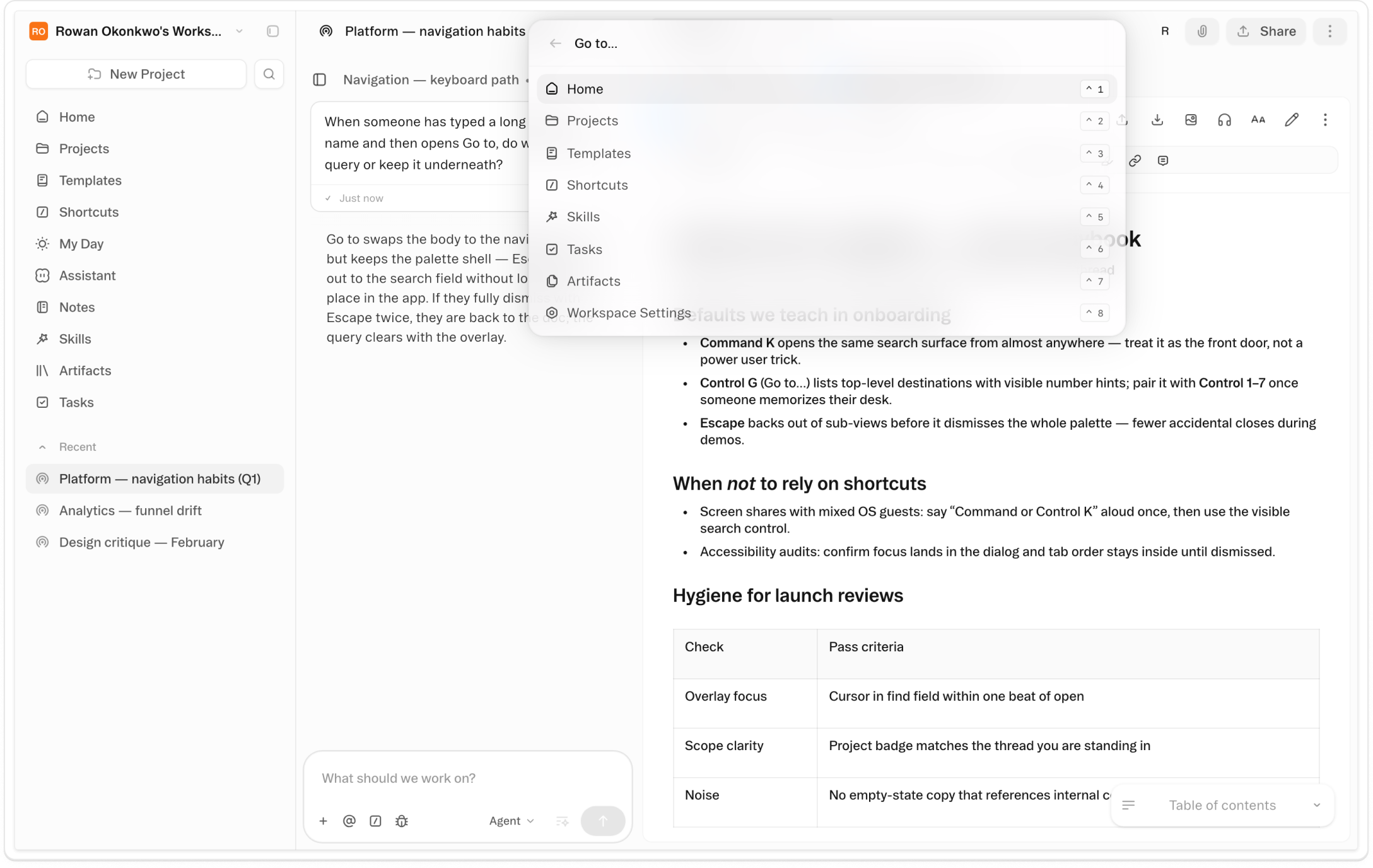
One keypress, anywhere. ⌘K (Ctrl+K on Windows and Linux) focuses the Obvious search input from wherever you are — no matter what project is open, what document is being edited, or how deep you are in a thread. Type three characters and you're moving. Every project, every thread, every artifact is one shortcut away.
Data & Analysis
Rating Field
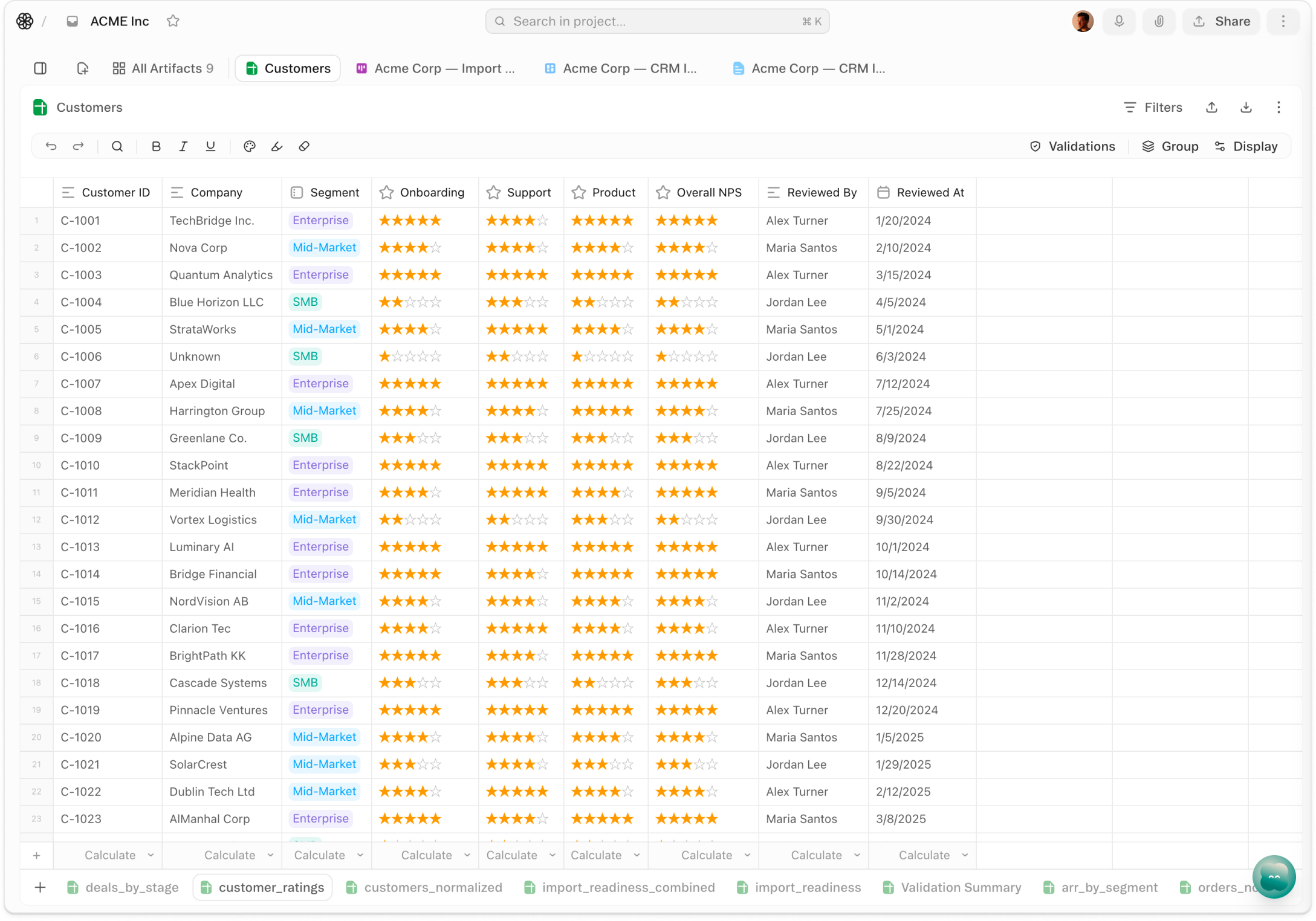
One click counts. Rating Field is the field type that turns a star click into a structured value — stored as an integer from 0 to 5, rendered as stars in any sheet, and immediately visible to every teammate in the row. Add it to any sheet the same way you'd add a date or a status: name the field, choose the type, and start clicking. The score appears in the cell; the data is already in the workspace.
Views
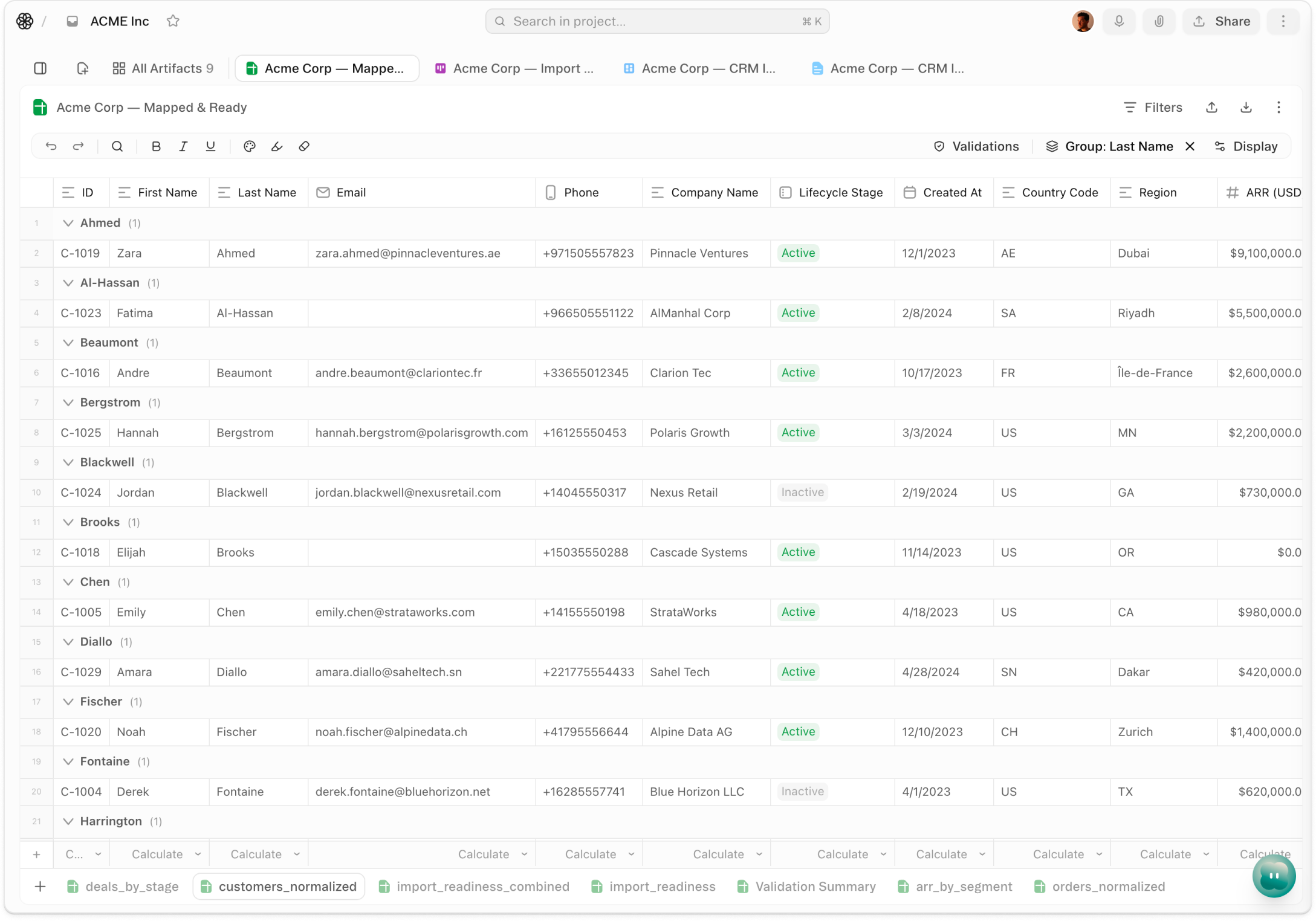
Grouped Views
One click counts. Rating Field is the field type that turns a star click into a structured value — stored as an integer from 0 to 5, rendered as stars in any sheet, and immediately visible to every teammate in the row. Add it to any sheet the same way you'd add a date or a status: name the field, choose the type, and start clicking. The score appears in the cell; the data is already in the workspace.
Agent & AI
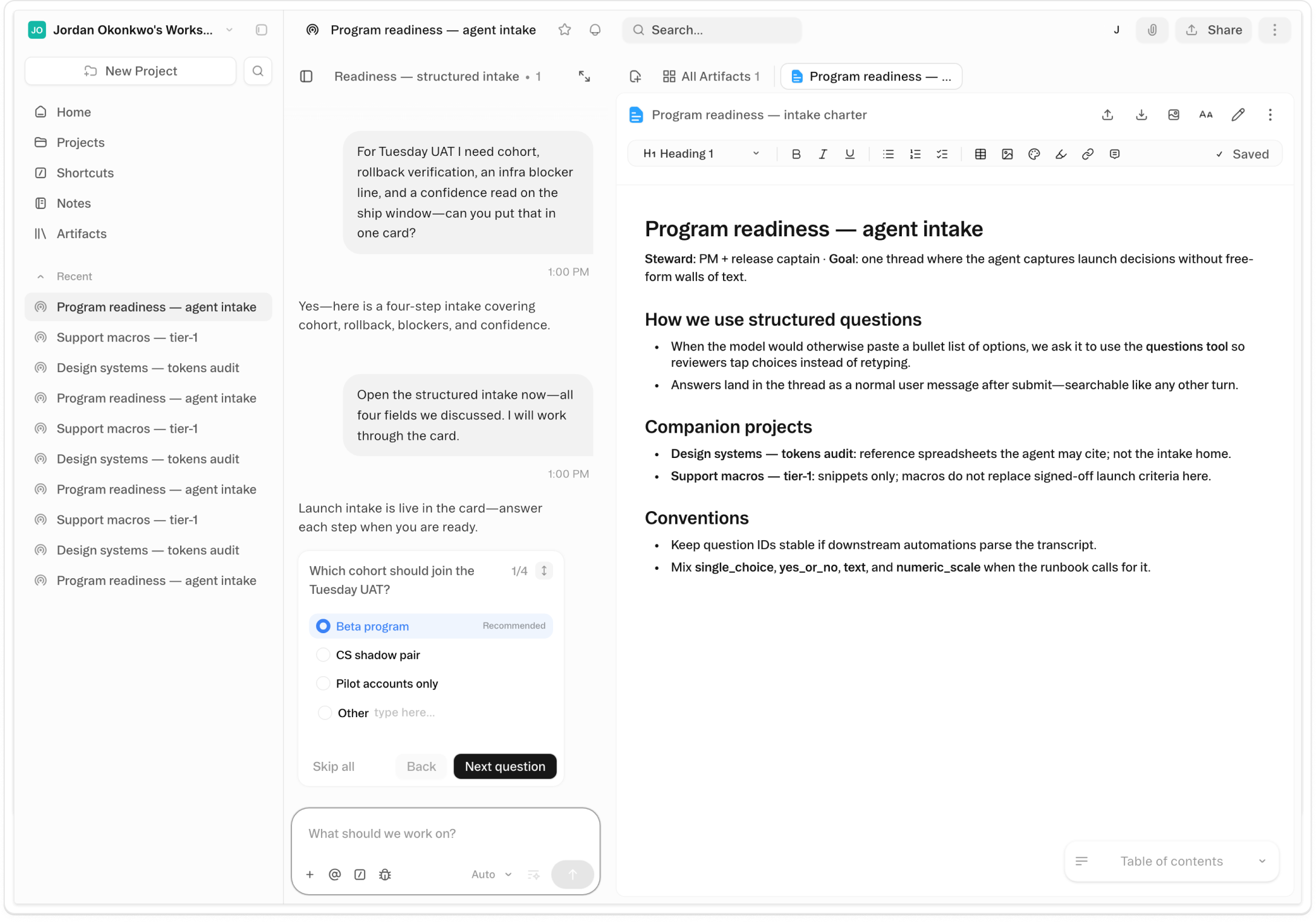
Questions
When the Obvious agent needs information before starting meaningful work, it surfaces a Questions card in the chat window. Each question is formatted to match the kind of answer it needs — a yes/no toggle, a single-choice picker, a multiple-choice list, a 1–10 scale, an ordering interface, or a short text field. Recommended answers come pre-filled: the agent's best guess based on what it already knows. You accept, adjust, or skip the card entirely and let the agent proceed on its own assumptions.
Agent & AI
Skills
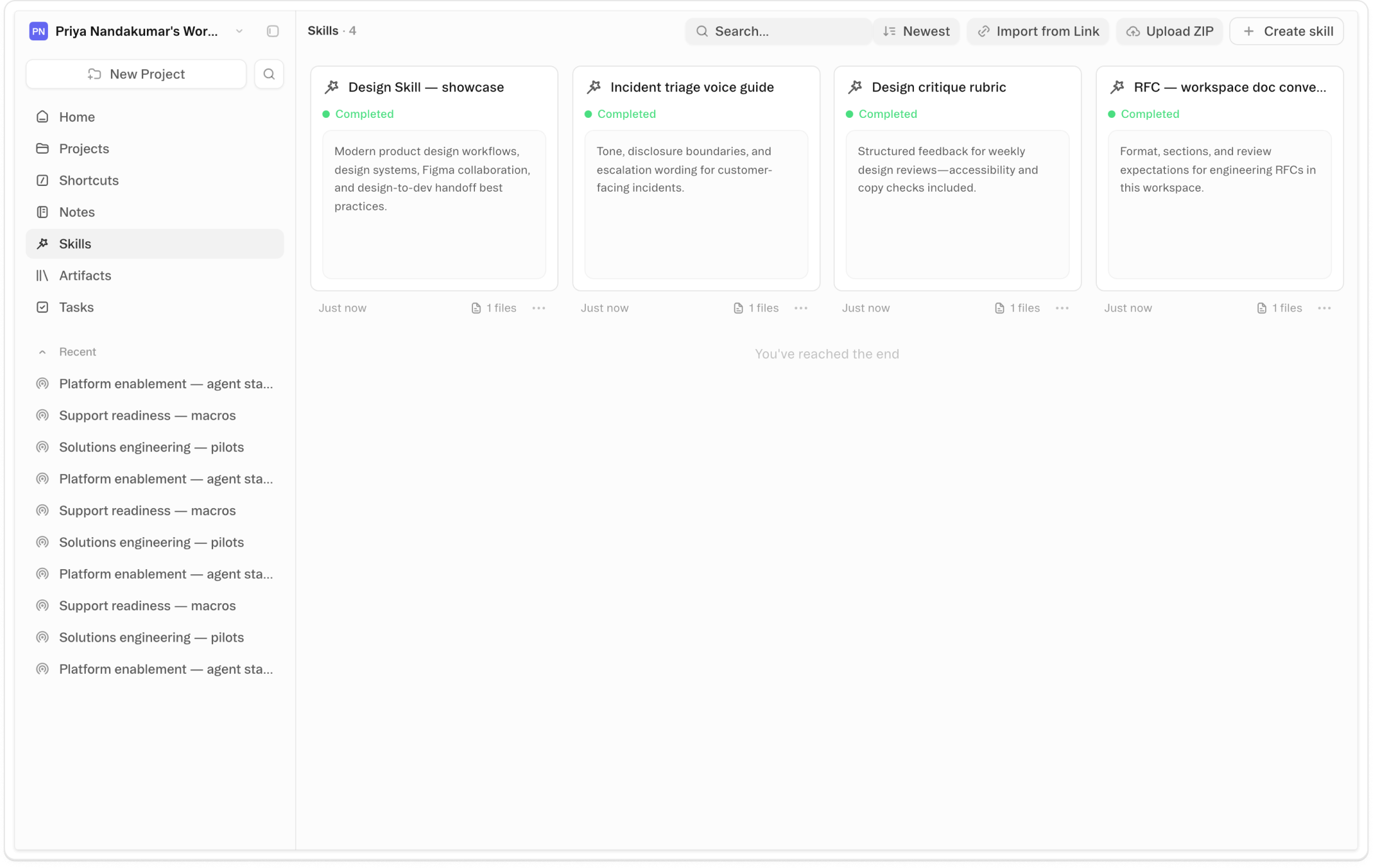
A skill tells the Obvious agent how to do something specific at a high level — a writing approach, a research workflow, a data process someone spent time figuring out. Skills load when they're relevant and stay out of the way when they're not. There's an entire ecosystem of them: communities of practitioners who've figured out remarkable things and shared them. Until now, getting those skills into Obvious required knowing your way around a terminal.
Automation
Tasks
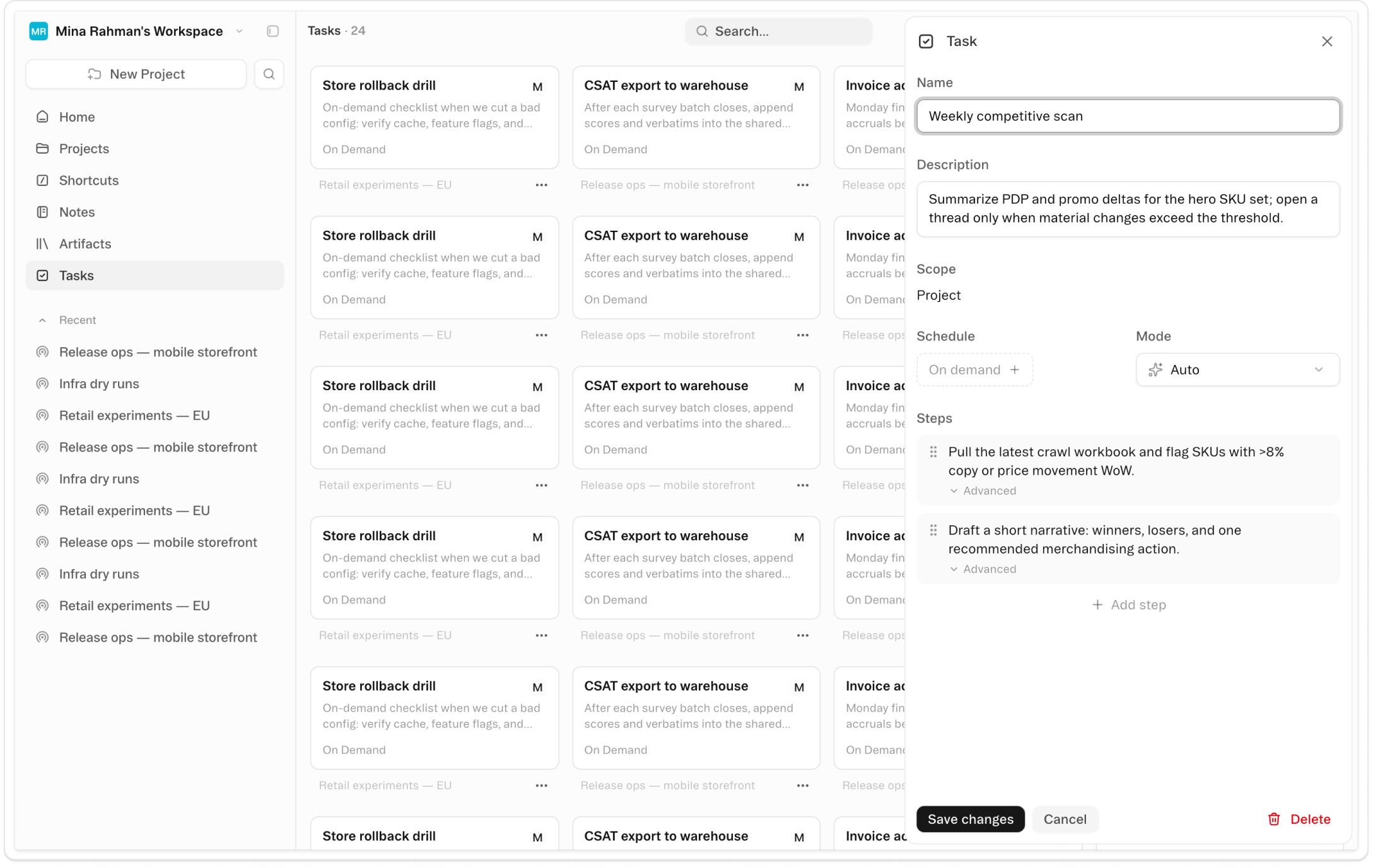
Tasks are saved, multi-step workflows the Obvious agent executes on its own. Name the steps, configure a trigger — a daily schedule, an incoming webhook, or nothing at all for on-demand use — and the agent runs them in sequence without you. Create a task by asking the agent directly, or build one manually from the / menu in chat.
Collaboration
Read Aloud
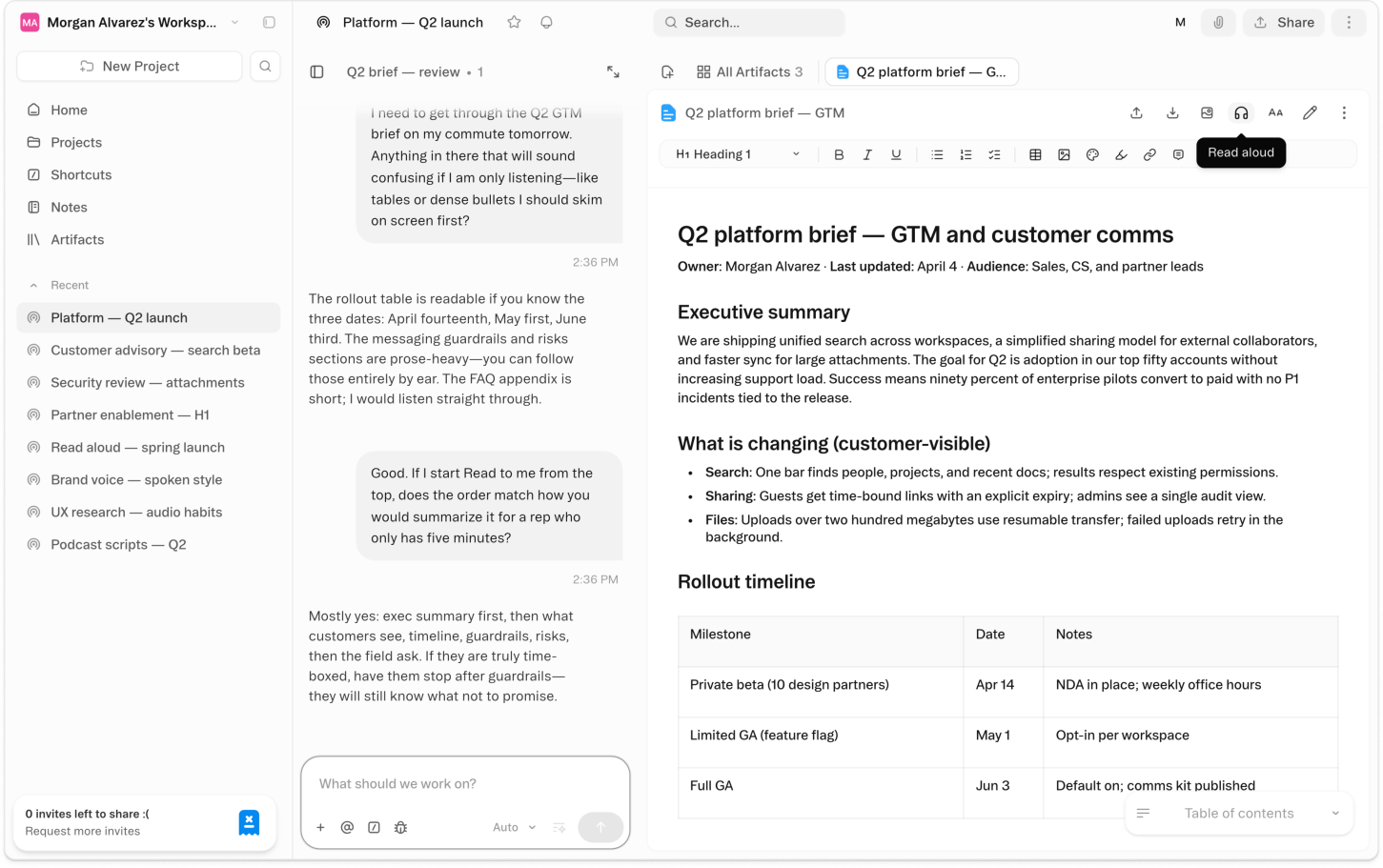
Open any document in Obvious, tap the Read Aloud button in the toolbar, and a floating playback bar appears at the bottom of your screen. The document starts reading in a natural-sounding voice. Navigate away — check another thread, open a workbook, come back — and it keeps going. The audio doesn't stop when you leave the page.
Platform
Folders & Tidy Up
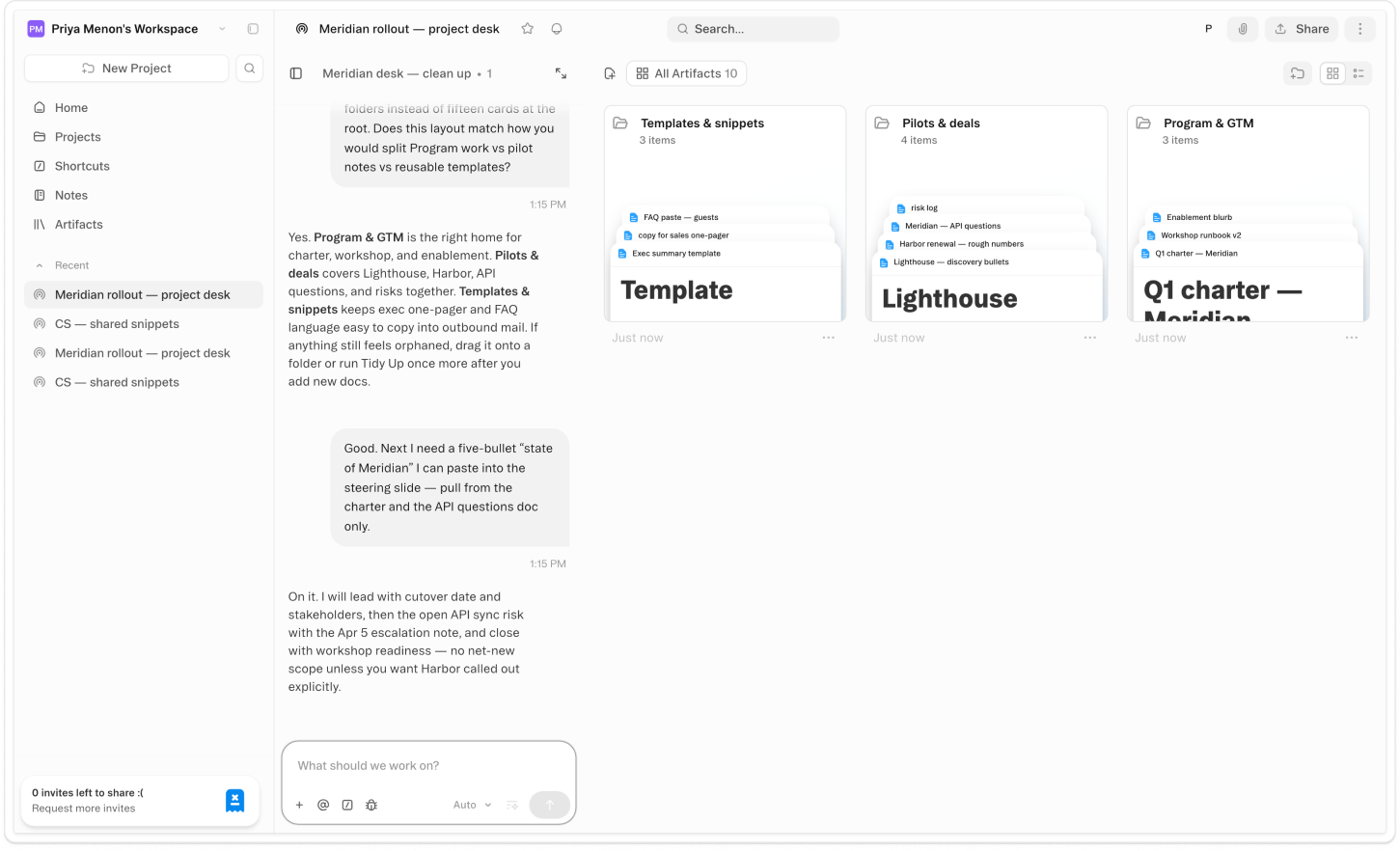
Create folders in your project sidebar, name them, nest them, and drag artifacts in. A launch project might have a folder per deliverable. A research project might have one per source. The structure is yours — Obvious holds whatever hierarchy fits how you think. Move artifacts by dragging, right-clicking, or @mentioning a folder name directly in chat.
Agent & AI
Granola MCP
Connect Granola in Settings → Connectors and the Obvious agent gains access to your entire meeting history — notes, transcripts, action items, and decisions. Ask it to pull in the last 30 days of meetings and it reads through all of them, finds what you committed to, and maps each item to the projects already running in your workspace.
Views
Gallery Views
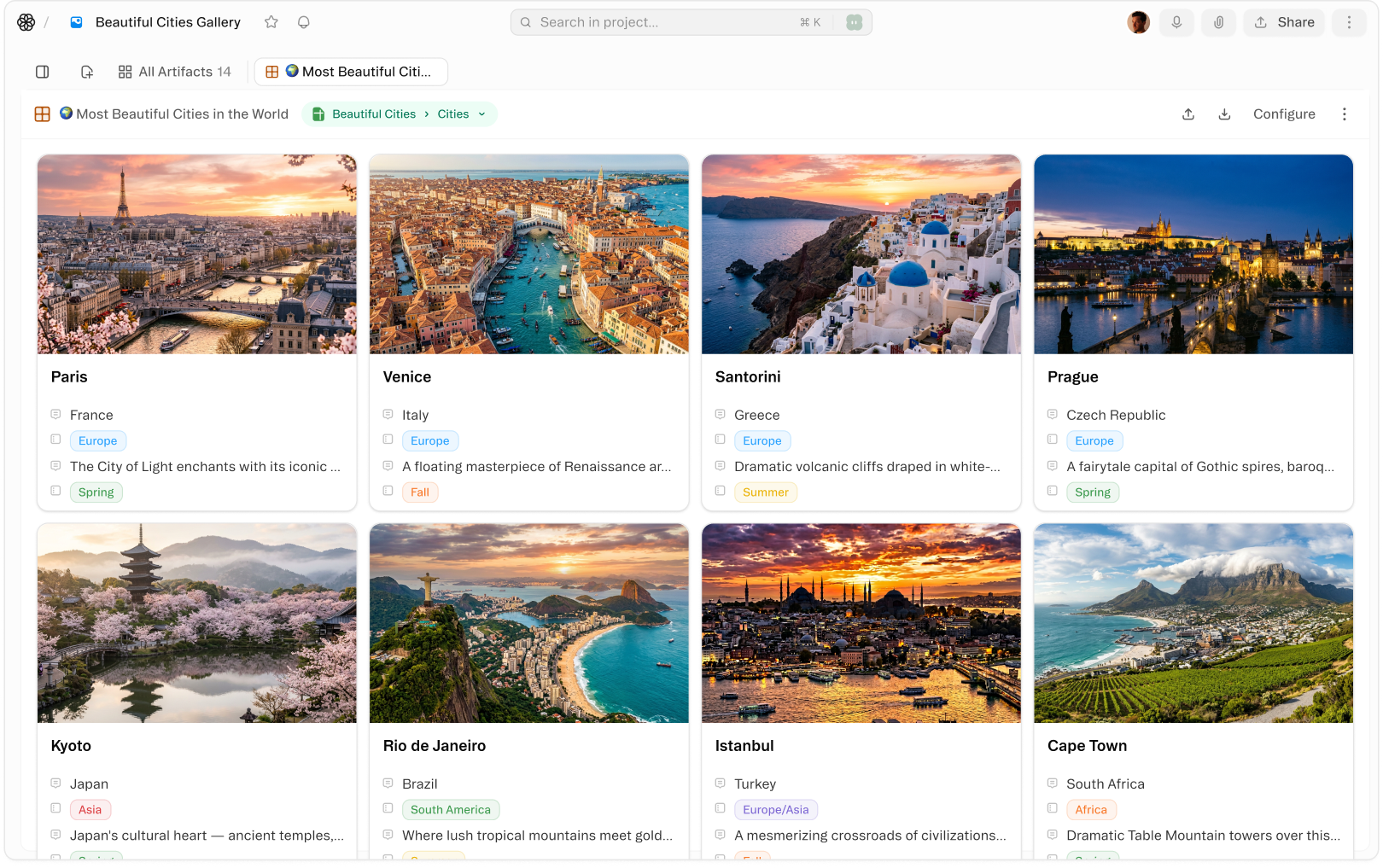
Turn any sheet into a visual card grid — ideal for product catalogs, content libraries, image datasets, and portfolio management. Cover images pull automatically from your records, making it easy to browse at a glance.
Agent & AI
Image Gen
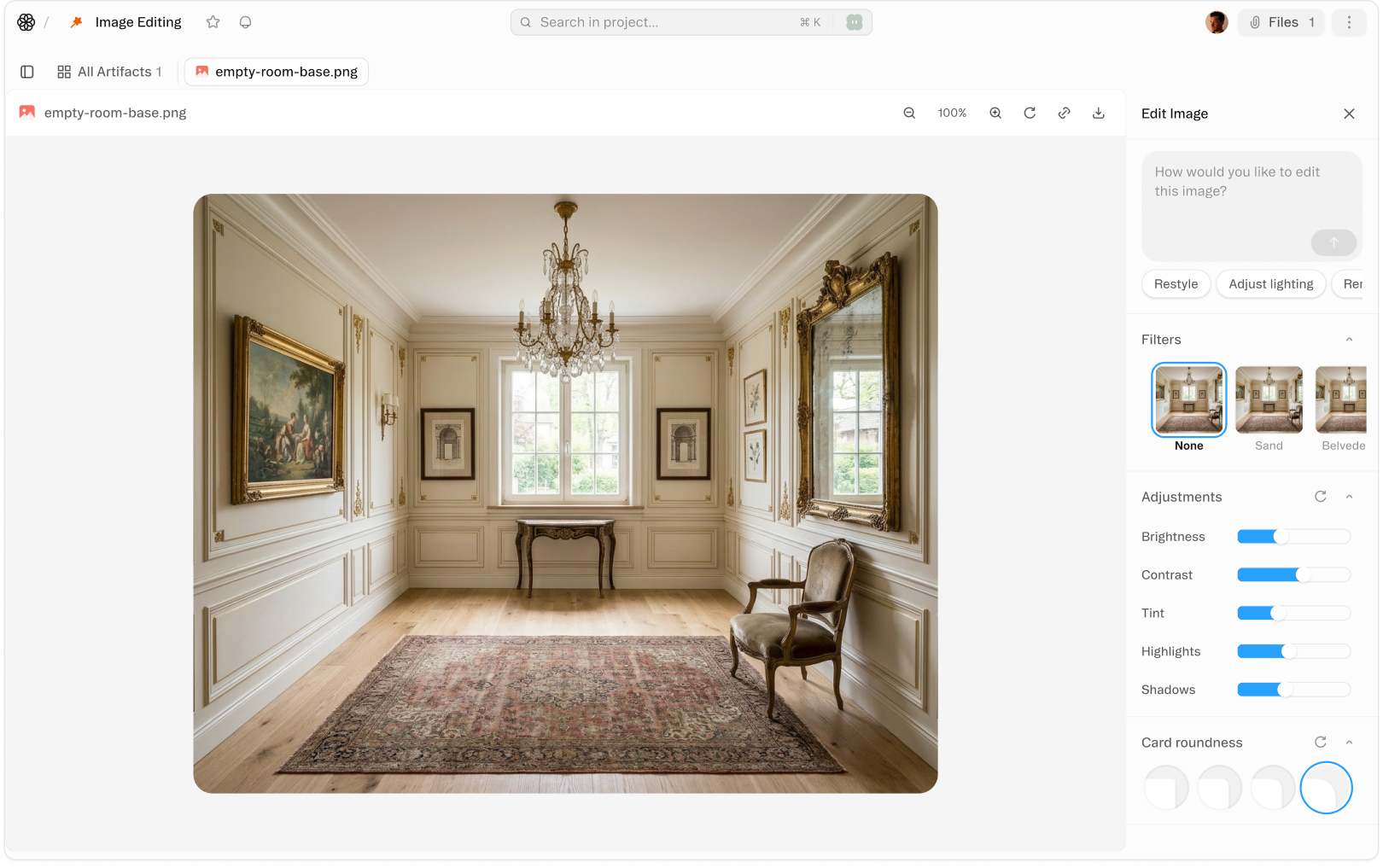
You can now generate and edit images in Obvious. Describe what you need like you'd describe it to a designer: a doc cover, a slide hero, a quick product mock, a labeled diagram.
Artifacts
Dashboards
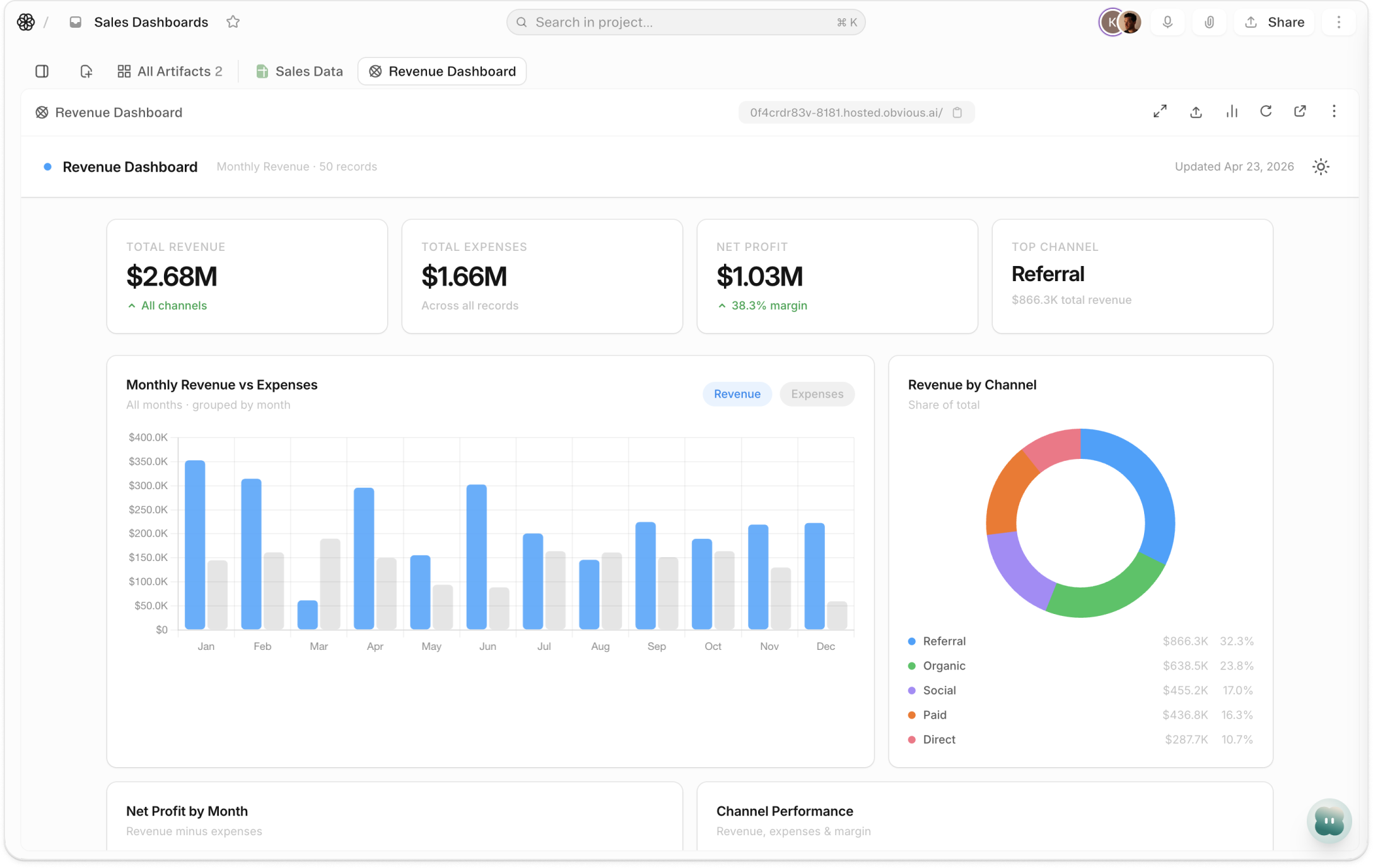
Ask the agent to build a dashboard. Name the sheet, name the metrics, describe the layout. It builds it — bar, line, pie, area, donut, scatter, radar. Charts appear in rows, text blocks alongside them, everything arranged side by side at whatever width you choose. The agent does the configuration. You get the picture.
Agent & AI
API Integrations
Any REST API, from a conversation. API Integrations lets the Obvious agent call external REST APIs on your behalf — authenticated, paginated, and parsed — without you writing a line of code. Store your credentials once in Secrets. Tell the agent what API you want to hit and what you need from it. It constructs the request, handles authentication via Bearer token or API key header, works through paginated responses, and returns the results as structured data in your workspace. The API is the connection. Obvious does the integration work.
Agent & AI
Code Sandbox
Run anything. No terminal required. Code Sandbox gives the Obvious agent a real Linux environment to work in. Describe what you need — clean a 40,000-row CSV, call a live API, build a chart from a custom formula — and the agent writes the code, runs it in the sandbox, and puts the result in your project. A CSV becomes a workbook. A Python chart becomes an embeddable image. A working web app gets a live URL. The output lands in your workspace the moment it's done. No download, no upload, no round-trip.
Agent & AI
Highlight Agent
Highlight any passage in a document. Click the Comment icon. Type your note — "tighten this," "wrong stat," "cut it by half" — and @mention the agent. It reads the full thread, reads the surrounding content, and acts. Makes the edit. Resolves the thread. No chat context to rebuild. No copy-pasting the sentence so the agent knows what you meant.
Agent & AI
Memory
Memory lets the Obvious agent hold onto what's worth holding onto. Tell it your preferred report format, your fiscal year definition, the schema your team agreed on last quarter — the agent writes it down. Not as a transcript. As a note it can use later. The next conversation starts with that knowledge already applied. No re-briefing. No copy-pasting your setup prompt. Just work.
Agent & AI
Modes
Pick the right agent for the work. Modes is the configuration layer that runs underneath every Obvious conversation. Auto reads each request and balances speed with deliberation — most of the time, it is the right choice. Fast runs on a lighter model for edits, quick lookups, and anything where turnaround matters more than depth. Deep Work slows down deliberately, applying concentrated reasoning to the problems where a wrong first answer is more expensive than a slow one. Analyst is tuned for quantitative work: querying data, building summaries, finding trends. The mode selector sits at the bottom of every chat input.
Agent & AI
Planning
The Plan Tool is the structured view the agent shows you before any complex work begins. Before it runs a single step, you see what it understood, what it plans to do, and in what order. The plan is laid out as a reviewable card with named objectives and sequenced tasks. You can read it, adjust the direction, approve it as-is, or stop and redirect. Nothing starts until you are aligned.
Agent & AI
Subthreads
It breaks the work apart. Give Obvious a request with multiple independent pieces — research three competitors, pull from four data sources, build a full content package — and it identifies what can run simultaneously. It spawns a focused agent for each piece. They work at the same time. When they finish, the main agent synthesizes everything into a single output. You make one request. The work moves like a team.
Agent & AI
Web Research
The results land in the work. Web Research lets the Obvious agent search the internet, read web pages, and write what it finds directly into your project — without leaving the workspace. Ask for competitive pricing, a market number, or a summary of what is new with a company this quarter. The agent searches, reads the most relevant pages, and produces the output in whatever you are building: a document you are drafting, a workbook column you need filled, a summary in the thread itself. No tab-switching. No copy-paste. The research is already inside the work when it is done.
Artifacts
Audio Recordings
Record, not import. Hit the microphone button in any Obvious project and recording starts — no separate app, no file to import. As you speak, a live transcript preview fills in below the waveform. Stop and save; within about a minute, Obvious delivers the full transcript via Azure Speech Services: speaker-detected, labeled, and ready.
Artifacts
Canvases
Sketch it, or say it. A Canvas is a freehand drawing and diagramming surface that lives in every Obvious project. Open one and you get an infinite whiteboard — place rectangles, ellipses, diamonds, arrows, lines, and text from the toolbar, connect shapes by dragging between their edges, and annotate anything freehand with the pencil tool. Everything saves automatically and lives in your project alongside your documents, workbooks, and files. The visual and the work it belongs with stay in the same place.
Artifacts
Doc Cover Images
Done the moment it opens. Doc Cover Images adds a full-width banner to any Obvious document — displayed above the title before a single line of body text. Add one in a single message to the agent: describe the image you want, and it generates and applies the cover without leaving the document. The result looks like something a designer touched.
Artifacts
Documents
Obvious documents go beyond text. Embed interactive tasks, cover images, collapsible sections, charts, YouTube videos, and inline comments — all in a clean markdown editor.
Artifacts
Files & Media
Every file type. One place. Files and Media lets you bring any file — a PDF, an image, a CSV, a recording — into an Obvious project. Drop it in by dragging it anywhere into the project view, clicking Upload in the sidebar, or attaching it directly in agent chat. The file lands in the Files section alongside your documents, workbooks, and views. Not in a separate drive. Not in your email. Right here, where the work already is.
Artifacts
Folios
Describe it. Your agent builds it. A Folio is a complete, styled web page — built by your agent, published from the same project where the work already lives. Tell it what you need: a client-facing report, a campaign landing page, an investor update, a team recap. It builds a full HTML page with real typography, embedded images, and structured layout. No code. No design tool. No second subscription.
Artifacts
Markdown Artifact
Click +, select Markdown. A Markdown Artifact is a named file you create directly in your project — the same way you'd open a sheet or start a document. Click +, select Markdown, and it opens immediately in Edit mode with a full CodeMirror 6 editor, syntax highlighting, and autosave. Write standard markdown: headings, code blocks, lists, links, blockquotes. Obvious saves two seconds after you stop typing. No export step. No save button.
Artifacts
Notes
Yours, not the project's. Notes is a personal capture space inside Obvious — open from anywhere, type what's on your mind, and close it. Meeting takeaways, half-formed ideas, something noticed but not yet articulable: anything that would otherwise land in a different app belongs here instead. Notes save automatically and stay private. Your teammates can't see them.
Artifacts
Presentations
From brief to deck in one conversation. Presentations is a native slide deck artifact type in Obvious. It lives in your project alongside the documents and workbooks that informed it — no separate tool, no export, no rebuilding from scratch. Describe the deck you need: topic, audience, the story you're telling. The agent drafts the structure, selects from twelve layout templates, writes the content, connects charts to your project sheets, and adds speaker notes. A Presentations artifact appears in your project, ready to open and refine.
Artifacts
Video Gen
Describe it, watch it appear. Video Gen is a video artifact in Obvious. Choose Text to Video, describe what you want — subject, motion, setting, mood — and Obvious builds the clip from scratch, up to 15 seconds. Choose Image to Video, upload a still image, describe the motion, and the frame animates to an 8-second clip. Both modes output in 16:9 or 9:16, with optional audio.
Artifacts
Workbooks
Your data, where your work is. Workbooks are the structured data layer in Obvious — sheets, rows, and typed fields that live in the same project as your documents, dashboards, and agent conversations. Create one from the + button, or describe what you need to track and the agent builds the schema. Every column has a type from the start. Not a free-form grid that slowly becomes unreadable.
Artifacts
iFrames
Your tools, right there. iFrames are a named artifact type in Obvious — same as a document or sheet. Paste in a URL and the page renders live inside your project: interactive, scrollable, fully functional. Click through a Retool dashboard, fill out a hosted form, navigate a prototype. No tab-switching. No "which link is current?" Your tools sit in the project grid next to your data, right where they belong.
Automation
Background Agents
Launch agents that run entirely in the background — no open tab required. Background agents handle long-running research, large-scale data processing, and multi-hour workflows. They notify you only when something needs attention or the work is done.
Automation
Gate Approvals
Automate up to the moment that counts. Gate Approvals let you build tasks that run automatically — and stop exactly where you need to be. A gate is a checkpoint you attach to any step. When the task reaches it, everything halts: no output sent, no record written, nothing marked complete. An approval card surfaces in the task's thread. The right person reviews and decides. Then the task continues.
Automation
Scheduled Tasks
Schedule any task on a cron or rrule — hourly, daily, weekly, or on a custom recurrence. Tasks run in the background and notify you of results. Build the workflow once and Obvious runs it automatically, forever.
Automation
Shortcuts
Save your most-used prompts as slash-command shortcuts accessible from anywhere in the app. Type / and pick from your personal library of prompt templates. Shortcuts support variables so each run can be personalized with dynamic inputs.
Automation
Webhooks
Any inbound POST request can trigger an Obvious task. Send webhooks from Stripe, GitHub, Intercom, or any service and Obvious processes the payload and executes the right workflow. No infrastructure required.
Collaboration
Comments
Right on the line. Right on the cell. Comments turns any Obvious artifact into a collaborative space. Highlight a passage in a document — a comment icon appears, a composer anchors to your selection, the text gets a visual mark, and your note lands in the sidebar. In a workbook, right-click any cell and choose Add comment — the thread attaches to that cell, a corner indicator tells everyone it's flagged, hover to preview, click to expand. One system that works the same way on every surface where work lives.
Collaboration
Notifications
Everything that needs you. Open the Notification Center from the bell icon in global navigation and every workspace event requiring your attention is waiting — approval gates, agent task completions, @mentions in document comments, scheduled task results, integration alerts. Items that need a decision land at the top: gates pending your approval, agents waiting for input. Updates and confirmations follow below. Nothing requires you to track down what finished. Obvious already did.
Collaboration
People & CRM
Search any person by name, company, or email and Obvious surfaces their CRM record, recent interactions, and context from your connected tools. Know exactly who you're working with before every meeting or message, without opening a separate app.
Collaboration
Permissions
Grant view or edit access at the workspace, project, or artifact level. Permissions cascade and can be overridden at any level. Guests can be scoped to a single document without seeing anything else in your workspace.
Collaboration
Real-time Sharing
Share in seconds. Start immediately. Real-time Sharing is how work moves between people in Obvious. Invite a collaborator by email, share with an entire team in one step, or open the project to everyone in your workspace — they're in immediately, with the access level you set. For external audiences, generate a public link: anyone with the URL gets a clean, read-only view, no account required. For tighter scoping, share a single artifact — a document, folio, workbook — with specific people or via link. That person sees exactly that artifact and nothing else.
Collaboration
Team Workspaces
Your team's foundation. Team Workspaces is the shared layer of Obvious — the place where everyone on your team gets access to the same projects, the same connected tools, and the same AI context, without rebuilding it from scratch. Invite someone by email. Assign their role. They step into a working environment your team already built. The agent knows what the team knows because the workspace is where that knowledge lives.
Data & Analysis
CSV & Excel Import
Drop a CSV or Excel file into any conversation and Obvious parses it, infers the schema, and creates a typed sheet. Bring in external data from any tool and it immediately becomes queryable, viewable, and agent-editable.
Data & Analysis
Data Transformation
Transform records with JavaScript map/reduce operations written by the agent. Reshape, enrich, filter, and aggregate data without writing a pipeline — describe the output you want and the agent generates the transform.
Data & Analysis
Data Validation
Mark fields as required, set type constraints, and flag out-of-range values. The agent scans sheets for data quality issues and annotates problem rows with inline explanations. Fix bad data at scale with a single instruction.
Data & Analysis
Formulas
Add calculated columns to any sheet using spreadsheet-style expressions or natural language. Formulas recalculate automatically as underlying data changes and work across joins between sheets.
Data & Analysis
Large File Processing
Process files over 100MB via direct S3 upload — no browser limits, no timeouts. The agent handles chunking, parallel processing, and result assembly. Analyze large datasets that would be impossible to open in a spreadsheet.
Data & Analysis
PDF Extraction
Upload a PDF and the agent extracts tables, lists, and key fields directly into a typed sheet. Works on contracts, invoices, research papers, and reports. Highlight any section and ask questions directly against the document content.
Data & Analysis
People Field
People Field is a new field type in Obvious sheets. Add one to any column, give it a name — Owner, Reviewer, Approved By — and every workspace member is immediately available. No list to build. No dropdown to maintain. Click into a cell, type a name, and the person appears: avatar, display name, live from your workspace roster. Select them. Done.
Data & Analysis
Record Sidebar
Click any record in Obvious and the Record Detail Panel opens as a docked sidebar on the right — all fields laid out in labeled rows, every input rendered natively. Date fields open a calendar picker. Enum fields open a dropdown. Long text fields expand to fill the space. Changes write the moment you make them. No save button. No modal. The sheet stays live behind the panel, so you never lose your place.
Data & Analysis
SQL Queries
Every sheet in Obvious is queryable with full DuckDB SQL. JOINs, aggregations, window functions, CTEs — the full dialect. Ask the agent to write the query, or write it yourself.
Data & Analysis
Schema Management
Add, rename, reorder, and remove fields from any sheet. Change field types, manage enum options, and update schemas across related views without breaking existing data. Schema changes propagate to all connected views instantly.
Data & Analysis
Version Control
Every change to a sheet is versioned automatically. Roll back to any previous state, compare field-by-field diffs between versions, and restore individual records without affecting the rest of the sheet.
Integrations
API Keys & Secrets
Connect once, act everywhere. Connectors & Secrets give your Obvious agent authenticated access to the external services your work actually runs on. Go to Settings then Connectors, click Connect on any OAuth service, and the agent gains live access immediately — your Google Calendar, Slack channels, Salesforce deals, GitHub repos, Linear issues, Notion databases. It decides what to call and when. You describe what you want done.
Integrations
CRM
Query and update Attio and Salesforce records from chat. Search contacts, create deals, log activity, and get AI-powered summaries of any CRM record — without opening the CRM interface.
Integrations
Calendar
Read and write Google Calendar and Outlook events from chat. Ask Obvious to schedule meetings, find open time slots, create recurring events, or summarize your agenda for the week — without switching applications.
Integrations
Read, compose, and send email from Gmail or Outlook entirely from chat. The agent triages your inbox, drafts replies in your voice, schedules follow-ups, and searches message history — without ever opening a mail client.
Integrations
File Storage
Back large files directly to S3 and process them at any scale. Upload files too large for in-browser processing, trigger transformations on new uploads, and link storage buckets directly to workbooks as live data sources.
Integrations
GitHub
Read repos, create branches, open and review pull requests, and manage issues from any conversation. The Employee mode agent uses the gh CLI to make real commits and open real PRs — not just suggest code changes.
Integrations
Meeting Notes
Connect Granola to sync meeting notes automatically into Obvious. Ask the agent to summarize decisions, extract action items, or search across past meeting transcripts. Your institutional memory, fully indexed and queryable.
Integrations
Notion
Read Notion pages and database records directly from any conversation. Pull context from your Notion workspace, query database properties, and use Notion content as input for tasks — your knowledge base, agent-readable.
Integrations
Slack
Send messages to any Slack channel, reply in threads, add reactions, and search message history — all from a single agent instruction. Trigger Obvious tasks from Slack with webhooks.
Integrations
Webhooks
Create inbound webhook endpoints that trigger Obvious tasks from any external system. Works with Stripe, GitHub, Intercom, Segment, and any service that supports outbound webhooks. Event data flows directly into task inputs.
Platform
@mentions
Type @ in the Obvious chat input and your entire workspace becomes searchable. Documents, sheets, columns, files, folders, people, skills, notes, meetings, templates — all of it. Select one and it embeds as a chip in your message. When you send, the agent receives the actual content of that item. Not its name. Not a search result. The thing itself.
Platform
Checkpoints
Snapshot the state of any artifact at any point. Roll back a document, sheet, or canvas to a previous checkpoint in its history. Experiment freely knowing you can always recover exactly what you had before.
Platform
Custom Modes
Name it. Configure it. Done. Custom Modes let you build a named agent configuration for the work you do most — choose the model, set how much it reasons, write the instructions it runs on, and lock down which tools it can access. Save it. It appears in your mode selector alongside Auto, Fast, Deep Work, and Analyst. One click, every time. No setup required when the work starts.
Platform
Developer API
The agent, from your code. The Developer API gives external systems direct access to the Obvious agent — the same one that works in the UI, running the same tools, producing the same artifacts, completing the same work. Authenticate with an API key and three REST endpoints become available: list your templates, create a project from any template with a prompt, and start additional agent sessions inside an existing project. The agent receives the prompt, reads the project context, and runs to completion. Your backend triggers it. Obvious handles everything from there.
Platform
Governance
The controls security teams check first. Governance is the enterprise security and compliance layer of Obvious — accessible to workspace owners and admins from workspace settings. Three controls apply across the entire workspace: Single Sign-On connects Obvious to your organization's identity provider via SAML 2.0 or OIDC, so members authenticate through the same system the rest of the company uses. IP Access Rules let admins define which IP addresses and networks can reach the workspace — everything outside the list is blocked and logged. Audit Logs capture a timestamped record of significant actions across the workspace, filterable by user, project, action type, or date range, and exportable as CSV or JSON.
Platform
Projects & Folders
Organize all your work into named projects and nested folders. Projects group related conversations, artifacts, tasks, and integrations. Share an entire project with teammates or keep it private — with granular control over each.
Platform
Search
Search every conversation, document, sheet, and shortcut across your entire workspace at once. Fuzzy, semantic, and exact match search — results ranked by relevance and recency. Find anything you've ever built or discussed in seconds.
Platform
Uploads Folder
Drag a file into Obvious or click to browse, and a folder picker appears inside the upload dialog. You choose the destination before the file lands — it goes directly to the folder you selected, visible in the sidebar the moment the upload completes. No sorting session afterward. No flat pile accumulating at the project root.
Platform
Workspace Management
Manage users, teams, billing, SSO configuration, and workspace settings from a single admin panel. Invite teammates, set default permissions, configure workspace-level integrations, and audit everything from one place.
Views
Calendar Views
Any sheet with a date column becomes a calendar in one click. See events, deadlines, and milestones by day, week, or month. Add new records directly on the calendar, and changes sync back to the sheet in real time.
Views
Forms
Any workbook schema becomes a shareable data collection form in one click. Collect structured responses from external users without giving them access to your workspace. Every submission lands directly in the sheet.
Views
Kanban Boards
Any sheet with a status column becomes a Kanban board in one click. Drag cards between columns to update status. Add new records directly on the board.
Views
Timeline
Visualize project plans with a Gantt-style timeline. Any sheet with start and end dates becomes a project roadmap instantly. Drag to reschedule, group by owner or status, and share as a live link with stakeholders.